# Data Port Driver Setup (2nd PC)
DATA Driver Setup (2nd PC)
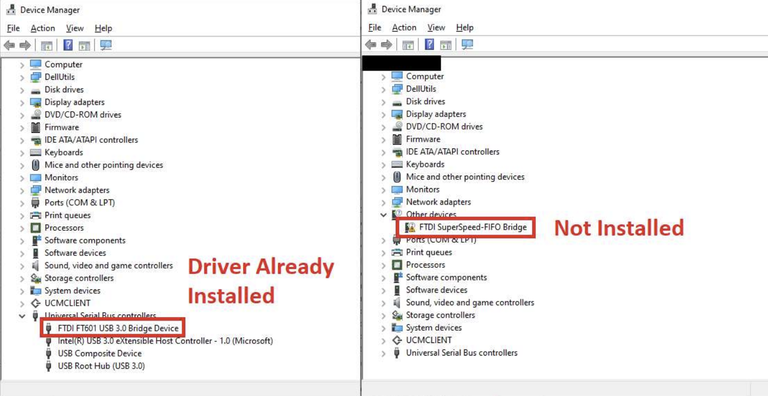
#### 🔍 **Check Your Current Driver Status**
1. Open **Device Manager** (Windows key + type `Device Manager`)
2. Look for one of these scenarios:
**✅ Correct Driver (No action needed)**
* Device appears as: **FTDI FT601 USB 3.0 Bridge Device**
* Located under: **Universal Serial Bus devices**
* **Status**: Working properly → Skip this guide
**⚠️ Missing Driver (Install now)**
* Device appears as: **FTDI SuperSpeed-FIFO Bridge**
* Located under: **Other devices**
* **Status**: Yellow exclamation mark → Proceed below
**❌ Wrong Driver (Remove first)**
* Device appears as: **FTDI SuperSpeed-FIFO Bridge**
* Located under: **Universal Serial Bus devices**
* **Action**: Right-click → **Uninstall device** → Check 'Delete driver'
* Then proceed with installation below
#### ⚙️ **Driver Installation**
**📥 Step 1: Download Driver**
**Download Driver**
* [FTD3XX Driver v1.3.0.10](https://ftdichip.com/wp-content/uploads/2024/06/FTD3XXDriver_WHQLCertified_1.3.0.10_Installer.zip) ← **Click to download**
**⚙️ Step 2: Install Driver**
1. **Extract** the downloaded `.zip` file
2. **Run** the `.exe` installer
3. Follow the installation wizard
4. Restart your computer if prompted
**🔄 Step 3: Verify Installation**
1. Re-open **Device Manager**
2. Should now see: **FTDI FT601 USB 3.0 Bridge Device** under **Universal Serial Bus devices**
3. If issues persist, try the **backup driver**
> ✅ The driver should now install successfully. You're now ready to proceed with [DMA testing](/skydrift-dma/dma-card/speed-test-2nd-pc.md).
***
---
# Agent Instructions: Querying This Documentation
If you need additional information that is not directly available in this page, you can query the documentation dynamically by asking a question.
Perform an HTTP GET request on the current page URL with the `ask` query parameter:
```
GET https://skydrift-dma.gitbook.io/skydrift-dma/dma-card/data-port-driver-setup-2nd-pc.md?ask=
```
The question should be specific, self-contained, and written in natural language.
The response will contain a direct answer to the question and relevant excerpts and sources from the documentation.
Use this mechanism when the answer is not explicitly present in the current page, you need clarification or additional context, or you want to retrieve related documentation sections.